

An NSFW channel on Discord is a channel that is gated behind an age confirmation, so adult content stays in one clearly marked place instead of leaking into the rest of your server. Setting one up takes about thirty seconds, but only if you know where the option lives now.
This guide covers how to add an NSFW channel in Discord on a new or existing channel, why the option is sometimes missing, who can actually see the channel once it is restricted, and the rules that apply to adult content on the platform.
What an NSFW Channel Actually Is
Discord used to call these NSFW channels. In the current interface and in Discord's own documentation the setting is called Age-Restricted Channel, and it sits inside a section labelled Content Visibility. The rename is why a lot of older tutorials point at a toggle that no longer exists.
Functionally nothing changed. An age-restricted channel asks everyone who opens it to confirm they are over the legal age, hides the channel entirely from members who are under 18, and takes the channel out of the explicit content filter's reach.
Server owners use it for two different reasons. The obvious one is adult content. The other is sensitive discussion that is not sexual at all, such as graphic news, mental health threads, or intense political argument. The setting is a gate, not a label, so you can use it for any channel where a confirmation makes sense.
Step-by-Step: How to Add an NSFW Channel in Discord
This is the full flow on desktop, which is where the setting lives. It works the same in the desktop app and in a browser.
Right-click the category the channel belongs in and choose Create Channel, or click the + icon next to the category name. Pick Text Channel, give it a name that makes the topic obvious, and click Create Channel.
Hover the new channel and click the gear icon that appears, or right-click it and choose Edit Channel. Stay on the Overview tab, which is the first one in the sidebar.
Scroll to Content Visibility. You get three choices: Default, Spoiler Channel, and Age-Restricted Channel. Select Age-Restricted Channel.
Click Save Changes at the bottom right. Discord shows a short notice explaining the age requirement. Confirm it and the channel is restricted immediately.
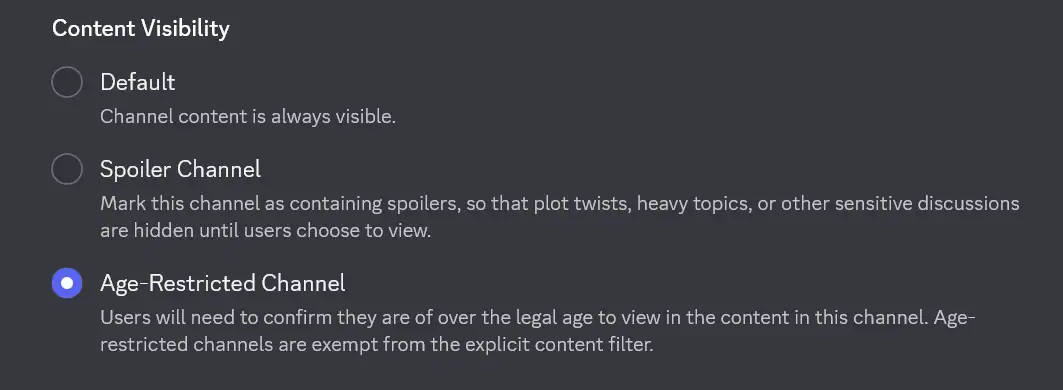
That is the whole process for a new channel. There is no separate "NSFW" switch any more, which is the single most common reason people think Discord removed the feature.
How to Make an Existing Channel NSFW
You do not need to create a new channel. Any text or voice channel can be restricted after the fact, including channels that have been active for years.
- Hover the channel and open Edit Channel.
- On the Overview tab, scroll to Content Visibility.
- Switch the selection from Default to Age-Restricted Channel.
- Click Save Changes and confirm the notice.
Existing message history stays where it is. Members who are over 18 keep seeing the channel and its past messages after confirming, while members under 18 lose access to the channel entirely. To undo it, pick Default again and save.
Can You Create NSFW Channels on Mobile?
Not directly. The mobile apps do not expose the Content Visibility options, so you cannot mark a channel as age-restricted from iOS or Android. You need the desktop app or a browser session to make the change.
Once a channel is restricted, mobile works normally: the channel appears in the list with the age warning and asks you to confirm before opening it. If you are on iPhone and the channel refuses to open, the iOS restriction described below is the usual reason.
If you only have a phone
Open a mobile browser, go to discord.com/app, and request the desktop site. The web client loads the full channel settings, including the age restriction option, and the channel list updates in your mobile app afterwards.
Who Can Access an NSFW Channel?
The gate is based on the birth date on the account, not on a self-declared confirmation, so it is worth understanding what each member actually experiences.
| Member | What they see | What happens when they open it |
|---|---|---|
Under 18 on the account | The channel is not shown in the channel list at all. | Nothing to open. The channel is hidden rather than locked. |
18 or older | The channel appears with an age warning marker. | A one-time confirmation per channel before the content loads. |
Flagged for age assurance | The channel is visible but gated. | Discord may ask for verification through a third-party vendor such as k-ID before access is granted. |
On iPhone or iPad | Age-restricted content is blocked by default because of App Store rules. | Enable it under User Settings > Privacy & Safety with the option that allows access to age-restricted servers on iOS. |
Two details trip people up. First, declining the confirmation does not hide the channel again, it simply leaves it unopened. Second, if a member says they are under 18 in a confirmation prompt, Discord blocks that channel and also blocks it in the future even if the birth date later changes.
Important Discord NSFW Rules
Restricting a channel is what makes adult content allowed in the first place. Discord's Community Guidelines permit sexual content in age-restricted spaces, and they treat the same content in an open channel as a violation, so the setting is a requirement rather than a style choice.
- Keep it in the restricted channel. Adult content in an all-ages channel can lead to warnings, channel removal, or server removal.
- Some content is never allowed. Content that sexualizes minors, non-consensual sexual content, and other illegal material is prohibited everywhere, age gate or not.
- Keep the public side safe. Server icons, banners, and public channel names must stay appropriate even when the server is age-restricted.
- You are responsible for the room. Server owners are expected to moderate their restricted channels, not just create them.
- Mark the server too when the whole thing is adult. A single NSFW channel does not make an adult server compliant, which is covered below.
The exemption in the channel settings is easy to misread. Age-restricted channels are exempt from the explicit content filter, which means Discord stops scanning media in that channel. It does not mean the rules stop applying there.
The same principle applies to your written rules. If you run a restricted channel, your server rules should say what is allowed in it and what stays banned everywhere, which is the approach in why server rules matter more than you think.
Does an NSFW Channel Make the Entire Server 18+?
No. Restricting a channel affects that channel only. The rest of the server stays visible to members of any age, and the server itself remains a normal server.
If the community is adult-focused as a whole, Discord expects the server level setting too: Server Settings > Access > Age-Restricted Server. That toggle gates the entire server at join, and it also makes the server ineligible for Discord's own Discovery, which is why adult communities usually rely on external directories instead. The full breakdown of that setting, and what it changes, is in does Discord have 18+ channels.
Finding and Listing Age-Restricted Communities
Because Discord hides restricted spaces from its built-in discovery, adult servers are difficult to find inside the app. Directories exist to fill that gap: you can browse NSFW Discord servers by topic, or start from the broader adult Discord server page and narrow down from there.
If you run one of these communities, the same directory is where you list it. Discordify accepts explicit servers as long as they follow the site rules and are tagged correctly at submission, and the Discordify guidelines spell out what must be marked and what is not allowed.
Common Problems and Fixes
Why the option is missing
- You are on the mobile app, which does not expose Content Visibility.
- You lack the Manage Channels permission in that server.
- You are looking for a toggle called NSFW, which no longer exists by that name.
- You opened Server Settings instead of the individual channel settings.
- You are editing a category rather than a channel.
Where to look instead
- Desktop app or browser, then Edit Channel.
- Ask the owner for Manage Channels, or have them make the change.
- Look for Content Visibility with three radio options.
- Right-click or use the gear icon on the channel itself.
- Create the channel inside the category first, then edit it.
Final takeaway
To add an NSFW channel in Discord, create or open the channel, choose Edit Channel, set Content Visibility to Age-Restricted Channel on the Overview tab, and save. The setting is now called age-restricted rather than NSFW, it has to be changed on desktop or in a browser, and it hides the channel from anyone under 18 while asking everyone else to confirm once. Restricting a channel does not make the whole server 18+, and it never exempts content from Discord's rules.